Free BIM Software for Students: 5 Tools to Master Before Graduating
Introduction
If you’re hunting for free BIM software for students, here’s the good news: you don’t need a single rupee, dollar, or credit card. Every tool in this guide is free for students right now, in 2026, and firms actually use these exact tools on live projects. So there’s no excuse for graduating without them.
Architecture school software costs can add up fast. A single commercial Revit or AutoCAD license runs hundreds of dollars a year, and studios often use three or four tools at once. Fortunately, that math changes completely once you know where to look for free BIM software for students. Autodesk, Trimble, and several open-source projects all offer full-featured student access at zero cost. As a result, the real barrier isn’t money. It’s simply knowing which five tools actually matter before you walk into your first interview.
Why Free BIM Software for Students Matters Before You Graduate
Revit remains the most widely used BIM software globally, with dominant market share across North America, the UK, and parts of Asia. In fact, over 685,000 professionals across architecture, engineering, and construction already use Autodesk’s BIM tools on active projects. So if you skip BIM training in school, you’re not just behind — you’re behind on the industry standard.
Here’s a number worth remembering: architecture students who enter firms with Revit proficiency report an average onboarding advantage of 2 to 4 weeks compared to those who learn on the job. That’s a full month of productivity you can bank before day one. Meanwhile, employers increasingly expect BIM proficiency as a baseline skill, not a bonus line on your resume.
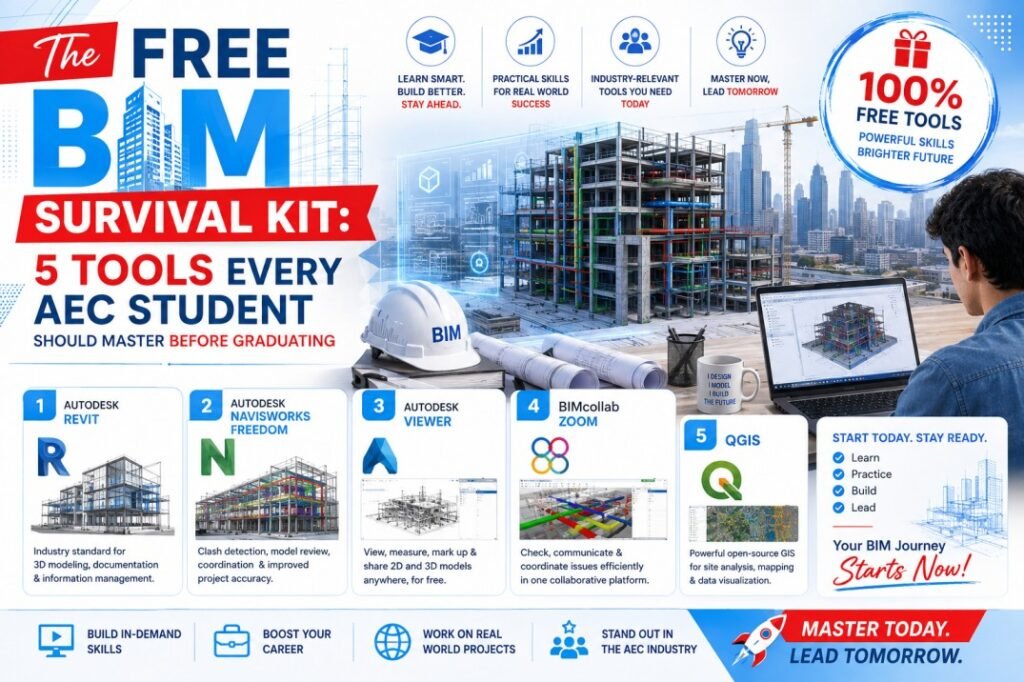
So let’s get into the five picks for free BIM software for students that actually make up your survival kit.
1. Autodesk Revit — The Top Pick for Free BIM Software for Students
Revit sits at the center of almost every professional BIM workflow, and Autodesk makes the full commercial version available to verified students at no cost through its Education Community.
What you get:
- The complete Revit product — not the stripped-down Revit LT version
- Full worksharing, MEP tools, and family editing capability
- One-year renewable access for as long as you’re enrolled
How to get it: Register with a valid school email address through Autodesk’s Education plan. Once verified, you also unlock AutoCAD and Fusion 360 in the same bundle, so you’re really getting three tools for one signup.
A quick tip here: always download the full Revit product, not Revit LT. Otherwise, you’ll miss the worksharing and MEP features that actually mirror professional practice.
2. Dynamo (Visual Programming for Revit)
Once you’ve got Revit down, Dynamo is your next move. It’s a free, built-in visual programming tool that automates repetitive BIM tasks — no coding experience required.
Why it matters: Firms use Dynamo constantly for clash detection workflows. For example, teams commonly use Dynamo scripts to read clash-report data and generate visual markers directly inside the model, which speeds up review dramatically compared to manually cross-checking reports by hand.
Additionally, Dynamo teaches you computational thinking early — the same skill that separates a basic BIM modeler from someone ready to step into a BIM coordinator role. Since it ships free with every Revit installation, there’s genuinely no reason to skip it.
If you want structured guidance instead of trial and error, Castallio’s Advance BIM Fundamental for Professional course walks through Dynamo and Revit together as part of a real, project-based curriculum — not isolated tutorials.
3. Navisworks Freedom — Free Model Viewer for Coordination Practice
Coordination is where BIM earns its keep, and Navisworks Freedom gives you a completely free way to practice it.
What it does:
- Opens, views, and navigates aggregated 3D model data
- Supports NWD and DWF file formats
- Requires no model preparation, server hosting, or setup costs
Consequently, you can use Navisworks Freedom to explore federated models exactly the way professional coordinators do, without paying for the full Navisworks Manage license. And once you’re comfortable navigating models, you’ll be ready to learn Clash Detective — the tool that identifies conflicts between structural, MEP, and architectural elements before they become expensive on-site problems.
Popular add-ins like BIM 360 Issues and Viewpoints Images Exporter extend this workflow even further, and many of them are free too.
4. FreeCAD or SketchUp Free (No-Cost Modeling Alternatives)
Not every school or student has consistent access to Autodesk’s ecosystem. That’s where FreeCAD and SketchUp Free step in.
FreeCAD is a genuinely open-source parametric platform with no license restrictions at all. Find it at freecad.org. You can use it commercially, share files freely, and install it on unlimited machines. Its BIM Workbench has matured significantly, and it now supports full parametric modeling, IFC import/export, 2D documentation, and schedules. In short, it’s a real professional tool at zero cost — not a stripped-down demo.
SketchUp Free runs entirely in your browser, so it’s ideal for quick massing studies and early-stage design iteration before you move into detailed Revit documentation.
Overall, these two tools give you flexibility. If your program doesn’t emphasize Autodesk software, or if you want a backup once your student license expires, FreeCAD in particular follows you into your career with zero ongoing cost.
5. Snaptrude (AI-Assisted Cloud BIM)
The final tool in your kit brings you closest to where the industry is actually headed. Snaptrude offers full access to its Pro plan through the Snaptrude for Education Program, and it’s completely free for verified students.
Why it’s different: Snaptrude combines genuine BIM capability with AI-assisted design and real-time cloud collaboration — reflecting exactly how modern firms are starting to work in 2026. Since the license requires only a verified academic email, there’s no complicated approval process either.
For learning workflows relevant to where the profession is heading — cloud-native models, real-time collaboration, and AI-assisted design — Snaptrude’s free plan is genuinely one of the best starting points available to students right now.
What This Means for You
So here’s your practical takeaway. Don’t try to master all five tools simultaneously in your final semester. Instead, build them in sequence:
- Start with Revit — it’s the industry standard, and everything else builds on it
- Add Dynamo once you’re comfortable navigating Revit’s interface and basic modeling
- Bring in Navisworks Freedom to practice model coordination and clash review
- Keep FreeCAD or SketchUp Free as a lightweight backup for quick iteration
- Try Snaptrude to get ahead of where cloud-based, AI-assisted BIM workflows are heading
This sequence mirrors how real BIM coordinators actually build their skill set on the job. And if you want that same structure, but compressed and mentor-led, Castallio’s BIM training programs walk students through this exact progression with live, 1-to-1 sessions instead of scattered YouTube tutorials.
Beyond Software: The Skill That Actually Gets You Hired
Here’s something worth remembering. Free tools get you in the door. But firms don’t hire people who simply know software — they hire people who understand BIM workflows, coordination logic, and how digital models translate into real project decisions.
That’s exactly the gap between a student portfolio and a job offer. So once you’ve worked through this five-tool kit, consider structured training that goes beyond software mechanics into actual BIM management and digital strategy. Castallio’s Advance BIM Management & Digital Strategy course covers ISO 19650, common data environments, and the strategic thinking that separates a BIM technician from a BIM leader — the exact leap most students never learn how to make until years into their career.
Conclusion: Free BIM Software for Students Is Only the First Step
Every tool in this guide to free BIM software for students costs nothing. The Revit onboarding advantage, the clash-detection fluency, the cloud-collaboration exposure — none of it requires a budget. It only requires you to start before graduation instead of after.
Most of your classmates will wait until their first job to learn these tools under pressure. You don’t have to be one of them.
Ready to build real BIM skills before you graduate? Explore Castallio’s BIM courses → and get a structured head start with the Advance BIM Fundamental Course.